Netcomm NB620W Manual do Utilizador
Consulte online ou descarregue Manual do Utilizador para Routers Netcomm NB620W. NetComm NB620W User's Manual Manual do Utilizador
- Página / 82
- Índice
- RESOLUÇÃO DE PROBLEMAS
- MARCADORES

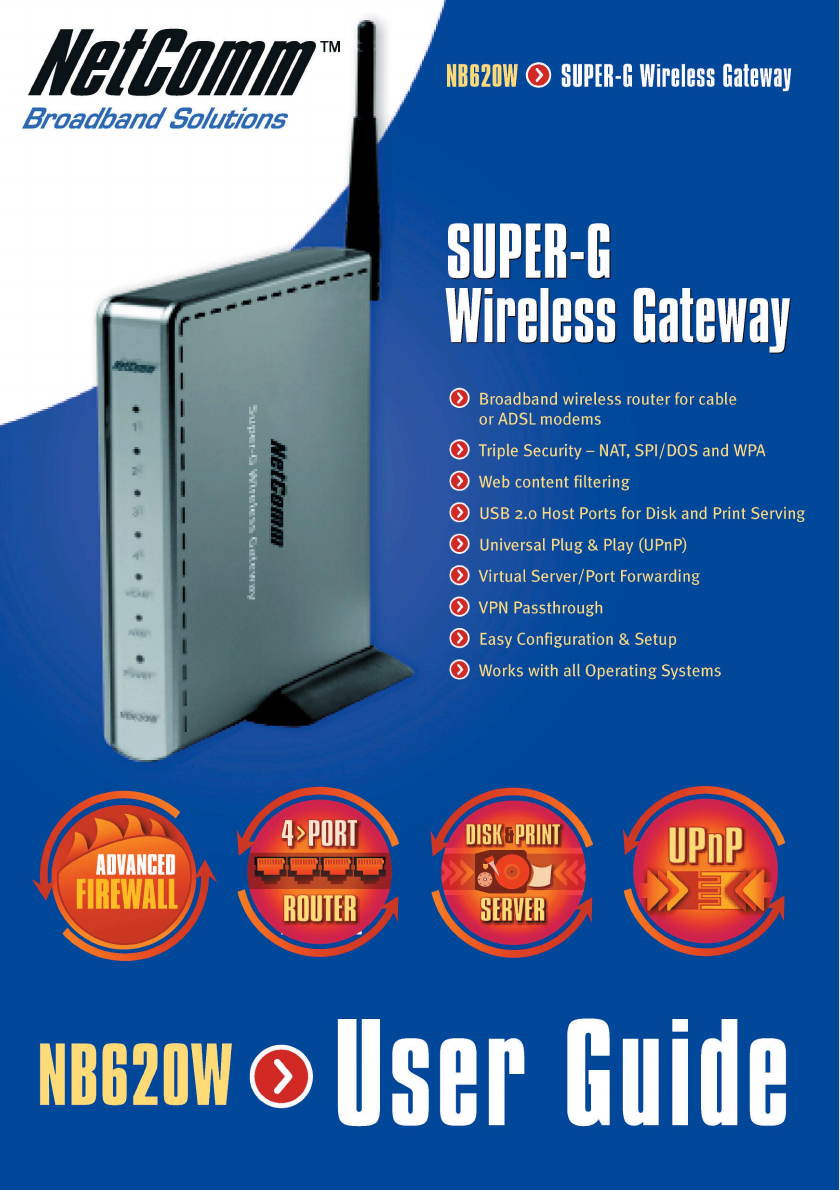
- Customer Information 2
- Contents 4
- Chapter 1 Introduction 5
- 1.2 Features and benefits 6
- Connecting your Gateway 8
- Connect the Ethernet Cables 8
- 1.5 Device 9
- 1.6 Factory Default 10
- 1.6.3 Default Values 11
- 2.1 Overview 12
- Network icon 13
- 14 www.netcomm.com.au 14
- 5. Restart your computer 16
- 18 www.netcomm.com.au 18
- 3.1 Basic Configuration 20
- PPPoE Configuration 21
- 22 www.netcomm.com.au 22
- Static IP Configuration 23
- PPTP Configuration 24
- 3.1.2 Local Port 26
- 3.1.3 Wireless LAN 28
- 30 www.netcomm.com.au 30
- 3.2 Advanced Items 31
- Define Group - Options 32
- Define Application - Options 33
- 34 www.netcomm.com.au 34
- 36 www.netcomm.com.au 36
- Email Alarm - Options 38
- 40 www.netcomm.com.au 40
- 44 www.netcomm.com.au 44
- 46 www.netcomm.com.au 46
- 3.3 Management 48
- User List 50
- Session List 51
- 52 www.netcomm.com.au 52
- 54 www.netcomm.com.au 54
- 56 www.netcomm.com.au 56
- 4. Click Next 58
- 8. Click Finish 60
- 11. Then click Next 61
- 62 www.netcomm.com.au 62
- 4. Click Finish 63
- 64 www.netcomm.com.au 64
- USB port 66
- Hardware 68
- Software 69
- 70 www.netcomm.com.au 70
- Q: What is MTU? 72
- Appendix C: Troubleshooting 73
- 74 www.netcomm.com.au 74
- Appendix E: Cable Connections 75
- RJ11 connector and cable 76
- 605 to RJ-11 adapter 77
- USB cable 77
- 9 Pin (RS-232 ) Serial Cable 77
- Contact Information 78
- Product Warranty 80
- Limitations of Warranty 81
Resumo do Conteúdo
NB620W Super-G Wireless Broadband Gateway User Guide YML725 Rev110 www.netcomm.com.au1.6 Factory DefaultReset Button. Press and hold the reset button
YML725 Rev1 NB620W Super-G Wireless Broadband Gateway User Guidewww.netcomm.com.au 111.6.3 Default ValuesThe default values are:User Name: adminPassw
NB620W Super-G Wireless Broadband Gateway User Guide YML725 Rev112 www.netcomm.com.auChapter 2 Configuring your ComputersChapter 2 Configuring your C
YML725 Rev1 NB620W Super-G Wireless Broadband Gateway User Guidewww.netcomm.com.au 132.2 Configuring Windows 98 and Millennium PCs1. Click the Start
NB620W Super-G Wireless Broadband Gateway User Guide YML725 Rev114 www.netcomm.com.au3. Click the IP Address tab. Select “Obtain an IP address automa
YML725 Rev1 NB620W Super-G Wireless Broadband Gateway User Guidewww.netcomm.com.au 152.3 Configuring Windows 2000 PCs1. Click the Start button. Selec
NB620W Super-G Wireless Broadband Gateway User Guide YML725 Rev116 www.netcomm.com.au4. Select Obtain an IP address automatically. Once the new windo
YML725 Rev1 NB620W Super-G Wireless Broadband Gateway User Guidewww.netcomm.com.au 172.4 Configuring Windows XP PCsThe following instructions assume
NB620W Super-G Wireless Broadband Gateway User Guide YML725 Rev118 www.netcomm.com.au3. Make sure the box next to Internet Protocol (TCP/IP) is check
YML725 Rev1 NB620W Super-G Wireless Broadband Gateway User Guidewww.netcomm.com.au 19Chapter 3 Configuring the Wireless GatewayChapter 3 Configuring
NB620W Super-G Wireless Broadband Gateway User Guide YML725 Rev12 www.netcomm.com.auLegal & Regulatory InformationThis manual is copyright. Apart
NB620W Super-G Wireless Broadband Gateway User Guide YML725 Rev120 www.netcomm.com.au3.1 Basic ConfigurationThe basic configuration contains Internet
YML725 Rev1 NB620W Super-G Wireless Broadband Gateway User Guidewww.netcomm.com.au 21PPPoE ConfigurationMost DSL-based ISPs use PPPoE (Point-to-Point
NB620W Super-G Wireless Broadband Gateway User Guide YML725 Rev122 www.netcomm.com.auPacket Size (MTU). The Maximum Transmission Unit of an IP packet
YML725 Rev1 NB620W Super-G Wireless Broadband Gateway User Guidewww.netcomm.com.au 23Static IP ConfigurationIf you connect to the Internet using a pe
NB620W Super-G Wireless Broadband Gateway User Guide YML725 Rev124 www.netcomm.com.auPPTP ConfigurationSome older modems use a PPTP connection instea
YML725 Rev1 NB620W Super-G Wireless Broadband Gateway User Guidewww.netcomm.com.au 25Packet Size (MTU). The Maximum Transmission Unit of an IP packet
NB620W Super-G Wireless Broadband Gateway User Guide YML725 Rev126 www.netcomm.com.au3.1.2 Local PortConfigure your gateway's Local Port IP addr
YML725 Rev1 NB620W Super-G Wireless Broadband Gateway User Guidewww.netcomm.com.au 27WINS Server. The Windows Internet Naming Service (WINS) manages
NB620W Super-G Wireless Broadband Gateway User Guide YML725 Rev128 www.netcomm.com.au3.1.3 Wireless LANClick Enable Wireless Access to enable the wir
YML725 Rev1 NB620W Super-G Wireless Broadband Gateway User Guidewww.netcomm.com.au 29The gateway supports four different types of security modes for
YML725 Rev1 NB620W Super-G Wireless Broadband Gateway User Guidewww.netcomm.com.au 3 Heed Warnings- Comply with all warning messages on the product
NB620W Super-G Wireless Broadband Gateway User Guide YML725 Rev130 www.netcomm.com.auWPA RADIUS: WPA RADIUS uses an external RADIUS server to perform
YML725 Rev1 NB620W Super-G Wireless Broadband Gateway User Guidewww.netcomm.com.au 313.2 Advanced ItemsThe gateway's advanced configuration allo
NB620W Super-G Wireless Broadband Gateway User Guide YML725 Rev132 www.netcomm.com.auDefine Group - OptionsGroup Name. Define a group name for each g
YML725 Rev1 NB620W Super-G Wireless Broadband Gateway User Guidewww.netcomm.com.au 33Define Application - OptionsApplication name. Define the name of
NB620W Super-G Wireless Broadband Gateway User Guide YML725 Rev134 www.netcomm.com.au3.2.2 Advanced Setup >>Content filteringThe content filter
YML725 Rev1 NB620W Super-G Wireless Broadband Gateway User Guidewww.netcomm.com.au 35Block URLs With IP Address. Check this box to block users typing
NB620W Super-G Wireless Broadband Gateway User Guide YML725 Rev136 www.netcomm.com.au3.2.3 Advanced Setup >> Dynamic DNSThe gateway offers a Dy
YML725 Rev1 NB620W Super-G Wireless Broadband Gateway User Guidewww.netcomm.com.au 373.2.4 Advanced Setup >> FirewallDoS Attack Threshold. When
NB620W Super-G Wireless Broadband Gateway User Guide YML725 Rev138 www.netcomm.com.auEmail Alarm - OptionsThe E-mail alarm feature enables you to rec
YML725 Rev1 NB620W Super-G Wireless Broadband Gateway User Guidewww.netcomm.com.au 393.2.5 Advanced Setup >> Remote ManagementUser Name, Passwo
NB620W Super-G Wireless Broadband Gateway User Guide YML725 Rev14 www.netcomm.com.auContentsChapter 1 Introduction ...
NB620W Super-G Wireless Broadband Gateway User Guide YML725 Rev140 www.netcomm.com.au3.2.6 Advanced Setup >> Static RoutesWhen you have more th
YML725 Rev1 NB620W Super-G Wireless Broadband Gateway User Guidewww.netcomm.com.au 413.2.7 Advanced Setup >> UPnPEnable UPnP. To enable UPnP cl
NB620W Super-G Wireless Broadband Gateway User Guide YML725 Rev142 www.netcomm.com.au3.2.8 Advanced Setup >> Virtual ServerThe virtual server a
YML725 Rev1 NB620W Super-G Wireless Broadband Gateway User Guidewww.netcomm.com.au 43Some applications need specified ports opened for Internet conne
NB620W Super-G Wireless Broadband Gateway User Guide YML725 Rev144 www.netcomm.com.au3.2.9 Advanced Setup >> Print ServerIn NB620W's advan
YML725 Rev1 NB620W Super-G Wireless Broadband Gateway User Guidewww.netcomm.com.au 453.2.10 Advanced Setup >> USB StorageWhen there is no USB s
NB620W Super-G Wireless Broadband Gateway User Guide YML725 Rev146 www.netcomm.com.auTo remove the USB storage device, please click Remove Disk butto
YML725 Rev1 NB620W Super-G Wireless Broadband Gateway User Guidewww.netcomm.com.au 47After logged in, you will see the listed files and directories o
NB620W Super-G Wireless Broadband Gateway User Guide YML725 Rev148 www.netcomm.com.au3.3 ManagementThese management features are provided to allow yo
YML725 Rev1 NB620W Super-G Wireless Broadband Gateway User Guidewww.netcomm.com.au 493.3.3 Management >> Firmware UpgradeFirmware can be upgrad
YML725 Rev1 NB620W Super-G Wireless Broadband Gateway User Guidewww.netcomm.com.au 5Chapter 1 IntroductionChapter 1 IntroductionChapter 1 Introductio
NB620W Super-G Wireless Broadband Gateway User Guide YML725 Rev150 www.netcomm.com.au3.3.4 Management >> Network StatusThe network status shows
YML725 Rev1 NB620W Super-G Wireless Broadband Gateway User Guidewww.netcomm.com.au 51Session ListList the sessions currently established. By watching
NB620W Super-G Wireless Broadband Gateway User Guide YML725 Rev152 www.netcomm.com.au3.3.5 Management >> Save ConfigurationTo save your current
YML725 Rev1 NB620W Super-G Wireless Broadband Gateway User Guidewww.netcomm.com.au 53Chapter 4 Configuring Printer SharingChapter 4 Configuring Print
NB620W Super-G Wireless Broadband Gateway User Guide YML725 Rev154 www.netcomm.com.au3. When you see this page, click LPT1 ECP Printer Port and then
YML725 Rev1 NB620W Super-G Wireless Broadband Gateway User Guidewww.netcomm.com.au 556. Click on Details Tab and then click the Add Port button.7. Cl
NB620W Super-G Wireless Broadband Gateway User Guide YML725 Rev156 www.netcomm.com.au8. Select LPR (TCP/IP) and then click OK.9. Type in the NB620W&a
YML725 Rev1 NB620W Super-G Wireless Broadband Gateway User Guidewww.netcomm.com.au 574.2 Configuring Printer Sharing on Windows 20001. Please go to S
NB620W Super-G Wireless Broadband Gateway User Guide YML725 Rev158 www.netcomm.com.au3. Click “Create a new port” and select Standard TCP/IP Port fro
YML725 Rev1 NB620W Super-G Wireless Broadband Gateway User Guidewww.netcomm.com.au 596. Choose Custom and click the Settings button.7. In the Protoco
NB620W Super-G Wireless Broadband Gateway User Guide YML725 Rev16 www.netcomm.com.au1.2 Features and benefitsThe NetComm NB620W Super-G Wireless Gate
NB620W Super-G Wireless Broadband Gateway User Guide YML725 Rev160 www.netcomm.com.au8. Click Finish.9. You have selected your printer port and proto
YML725 Rev1 NB620W Super-G Wireless Broadband Gateway User Guidewww.netcomm.com.au 6110. You can click Yes to print out a test page or click No to sa
NB620W Super-G Wireless Broadband Gateway User Guide YML725 Rev162 www.netcomm.com.au4.3 Configuring NB620W Printer Sharing on Windows XP PCs1. Pleas
YML725 Rev1 NB620W Super-G Wireless Broadband Gateway User Guidewww.netcomm.com.au 633. Click Create a new port and select Standard TCP/IP Port from
NB620W Super-G Wireless Broadband Gateway User Guide YML725 Rev164 www.netcomm.com.au6. Choose Custom and Click the Settings button.7. In the Protoco
YML725 Rev1 NB620W Super-G Wireless Broadband Gateway User Guidewww.netcomm.com.au 658. Click Finish.9. You have selected your printer port and proto
NB620W Super-G Wireless Broadband Gateway User Guide YML725 Rev166 www.netcomm.com.au10. Give the printer a name, and then click Next.11. You can cli
YML725 Rev1 NB620W Super-G Wireless Broadband Gateway User Guidewww.netcomm.com.au 67Appendix A: Technical SpecificationsAppendix A: Technical Specif
NB620W Super-G Wireless Broadband Gateway User Guide YML725 Rev168 www.netcomm.com.auHardware Access Interface WAN: One 10/100 Base TX port, Auto se
YML725 Rev1 NB620W Super-G Wireless Broadband Gateway User Guidewww.netcomm.com.au 69SoftwareNetworking /Transport layer protocol 802.1D Bridge for
YML725 Rev1 NB620W Super-G Wireless Broadband Gateway User Guidewww.netcomm.com.au 71.3 What's in the package?Your NB620W Package should contain
NB620W Super-G Wireless Broadband Gateway User Guide YML725 Rev170 www.netcomm.com.auManagement Web-based configuration wizard Web-based firmware u
YML725 Rev1 NB620W Super-G Wireless Broadband Gateway User Guidewww.netcomm.com.au 71Appendix B: Frequent Asked QuestionsAppendix B: Frequent Asked Q
NB620W Super-G Wireless Broadband Gateway User Guide YML725 Rev172 www.netcomm.com.auQ: What's MX (Mail Exchanger)? And why MX?A: The Internet e
YML725 Rev1 NB620W Super-G Wireless Broadband Gateway User Guidewww.netcomm.com.au 73Appendix C: TroubleshootingAppendix C: TroubleshootingAppendix C
NB620W Super-G Wireless Broadband Gateway User Guide YML725 Rev174 www.netcomm.com.auAppendix D: DDNS Update Status MessagesAppendix D: DDNS Update S
YML725 Rev1 NB620W Super-G Wireless Broadband Gateway User Guidewww.netcomm.com.au 75Appendix E: Cable ConnectionsAppendix E: Cable ConnectionsAppend
NB620W Super-G Wireless Broadband Gateway User Guide YML725 Rev176 www.netcomm.com.auStraight and crossover cable configurationFigure 3Figure 4RJ11 c
YML725 Rev1 NB620W Super-G Wireless Broadband Gateway User Guidewww.netcomm.com.au 77605 to RJ-11 adapterThe 605 to RJ-11 adaptor is provided to comp
NB620W Super-G Wireless Broadband Gateway User Guide YML725 Rev178 www.netcomm.com.auAppendix F: Registering your NetComm ProductAppendix F: Register
YML725 Rev1 NB620W Super-G Wireless Broadband Gateway User Guidewww.netcomm.com.au 79Customer InformationACA (Australian Communications Authority) re
NB620W Super-G Wireless Broadband Gateway User Guide YML725 Rev18 www.netcomm.com.au1.4 Connecting the NetComm Super-G Wireless GatewayA typical Inte
NB620W Super-G Wireless Broadband Gateway User Guide YML725 Rev180 www.netcomm.com.auProduct WarrantyThe warranty is granted on the following conditi
YML725 Rev1 NB620W Super-G Wireless Broadband Gateway User Guidewww.netcomm.com.au 81Limitations of WarrantyThe Trade Practices Act 1974 and correspo
YML725 Rev1 NB620W Super-G Wireless Broadband Gateway User Guidewww.netcomm.com.au 9Connect the Power CableConnect the power adapter to the power soc
Manuais e produtos relacionados com Routers Netcomm NB620W
 (2 páginas)
(36 páginas)
(2 páginas)
(85 páginas)
(53 páginas)
(2 páginas)
(36 páginas)
(2 páginas)
(85 páginas)
(53 páginas)
© 2020, manymanuals-pt.com. Todos os direitos reservados. | 0.090 s |
 Manymanuals.com
 Manymanuals.de
 Manymanuals.fr
 Manymanuals.it
 Manymanuals.pl
 Manymanuals.cz
 Manymanuals.es
 Manymanuals-pt.com
Comentários a estes Manuais